






Whether you are performing routine maintenance, installing a new sound system, or trying to reset your vehicle’s onboard computer, knowing how to disconnect a car battery properly is a fundamental automotive skill. While it may seem like a simple task, doing it in the wrong order can lead to electrical shorts, blown fuses, or even personal injury.
Modern vehicles are more sensitive than their predecessors. Proper electrical handling ensures you don’t damage expensive electronic control units (ECUs). Furthermore, regular battery care is the best way to extend the life of your vehicle’s power source. If you find yourself needing to jump-start or disconnect your battery frequently, you should investigate how long do car batteries last? to see if your unit is simply reaching the end of its natural lifecycle.
Preparation and Safety Essentials
Before you touch a wrench, you must ensure you have a safe working environment. Car batteries contain sulfuric acid and can produce flammable hydrogen gas.
Required Tools
- Wrench or Socket Set: Most battery terminals use a 10mm nut, though some American or older vehicles may require a 1/2-inch or 13mm wrench.
- Safety Gear: Wear work gloves to protect against acid residue and safety goggles to protect your eyes from potential sparks.
- Illumination: If you are working in a dim garage or at night, ensure you have a reliable light source. Once you have finished the job and secured the battery, make sure you know how do i turn off torch? on your mobile device or flashlight to conserve power.
How to Properly Disconnect a Car Battery (The Safe Way)
The order in which you remove the cables is the most important part of this process. To avoid a “short circuit,” you must follow the negative-first rule.
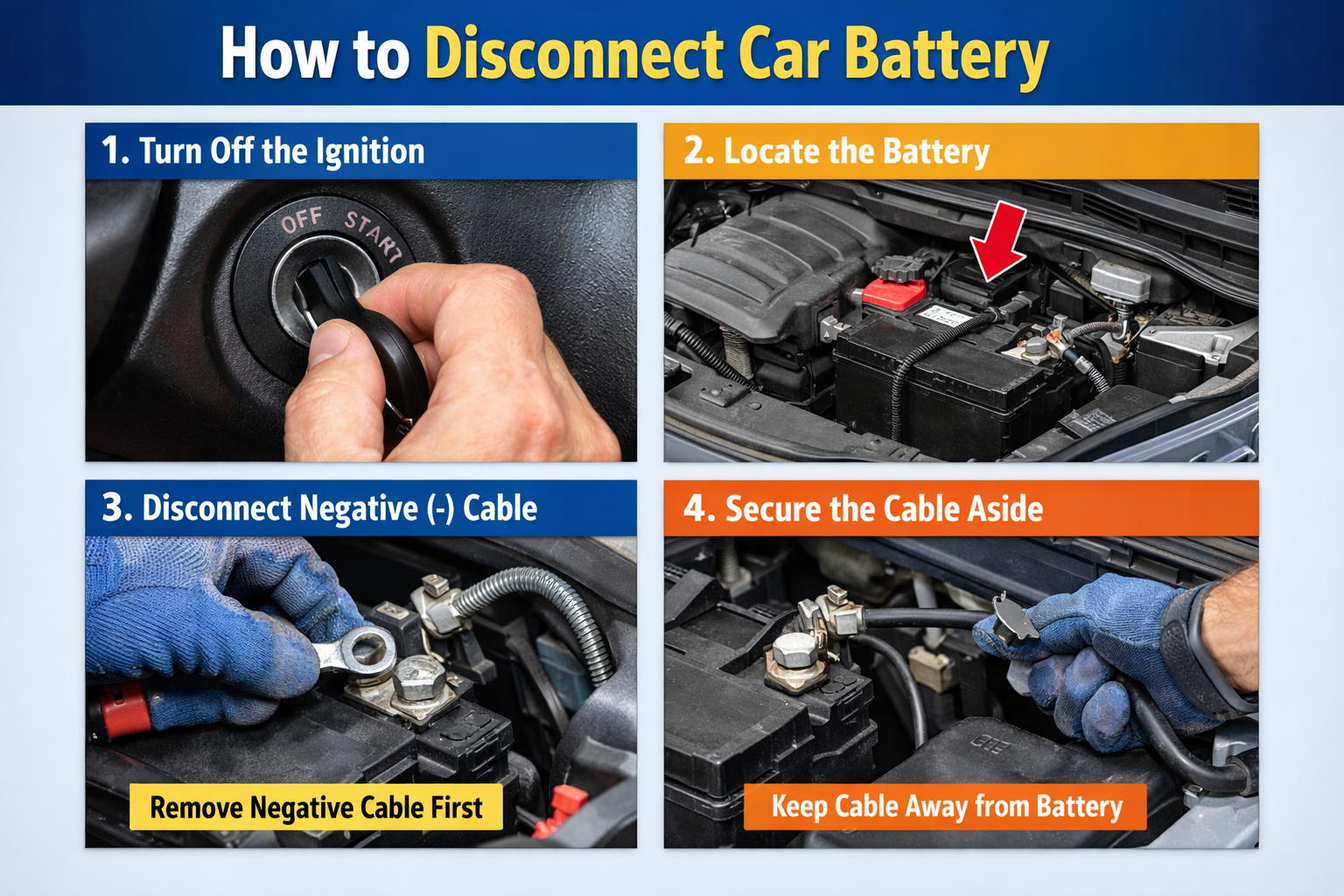
AEO Answer: To safely disconnect a car battery, always start by loosening the nut on the Negative (black/-) terminal first using a wrench. Slide the cable completely off the post and tuck it aside so it cannot spring back and touch the terminal. Repeat the process for the Positive (red/+) terminal. Removing the negative cable first ensures that if your tool touches the metal frame of the car while loosening the positive side, it won’t create a dangerous electrical spark.
Step-by-Step Instructions:
- Turn off the Ignition: Ensure the engine is off and the keys are removed from the ignition.
- Locate the Terminals: Open the hood and find the battery. The Negative terminal is usually black and marked with a minus (-) sign. The Positive terminal is red and marked with a plus (+) sign.
- Disconnect the Negative Cable: Use your wrench to loosen the nut on the negative terminal. You don’t need to remove the nut entirely; just loosen it enough to wiggle the cable off the post.
- Disconnect the Positive Cable: Repeat the process for the positive side. Be careful not to let your metal wrench touch any other metal part of the car while you are in contact with the positive terminal.
- Secure the Cables: Move the cables far away from the battery posts to prevent accidental contact.
How Long to Leave Battery Disconnected to Reset Car Computer?
A common reason for disconnecting a battery is to “reset” the Engine Control Unit (ECU) to clear minor error codes or reset the “Check Engine” light after a repair.
If you are asking how long to leave battery disconnected to reset car computer, the general rule of thumb is 15 to 30 minutes.
Why the wait?
Modern cars have capacitors that store electricity even after the battery is removed. These capacitors keep the computer’s memory active for several minutes. By waiting at least 20 minutes, you allow the electricity to fully drain, which forces the computer to clear its temporary memory and “re-learn” idle patterns and fuel-to-air ratios once reconnected.
Maintenance and Long-Term Storage
If you are disconnecting your battery because you plan to store your vehicle for the winter, you are making a smart move. A connected battery will experience “parasitic drain” from the car’s clock, alarm system, and computer, which can kill a healthy battery in just a few weeks.
Tips for Battery Longevity:
- Clean the Terminals: While the battery is disconnected, use a mixture of baking soda and water with a wire brush to scrub away any white or green powdery corrosion.
- Apply Terminal Protector: Use a specialized spray or a thin layer of petroleum jelly on the terminals before reconnecting to prevent future oxidation.
- Check the Age: Even with perfect maintenance, chemical degradation is inevitable. Refer to our guide on how long do car batteries last? to determine if it’s safer to replace your battery before it leaves you stranded.
Summary of Connection Order
| Action | First Cable | Second Cable |
| Disconnecting | Negative (Black/-) | Positive (Red/+) |
| Connecting | Positive (Red/+) | Negative (Black/-) |
By following these safety protocols, you can perform your own car maintenance with confidence and protect your vehicle’s sensitive electronic systems.
Would you like me to create a guide on how to jump-start a car safely or a list of the best car batteries for cold climates?